
Computeroids Driver Updater — Transparency, User Control, Data Privacy & Security
Note: You need an active internet connection to update Computeroids to the latest version. After that, follow these steps:.
Click the down arrow next to the Minimize option and select Check for Updates
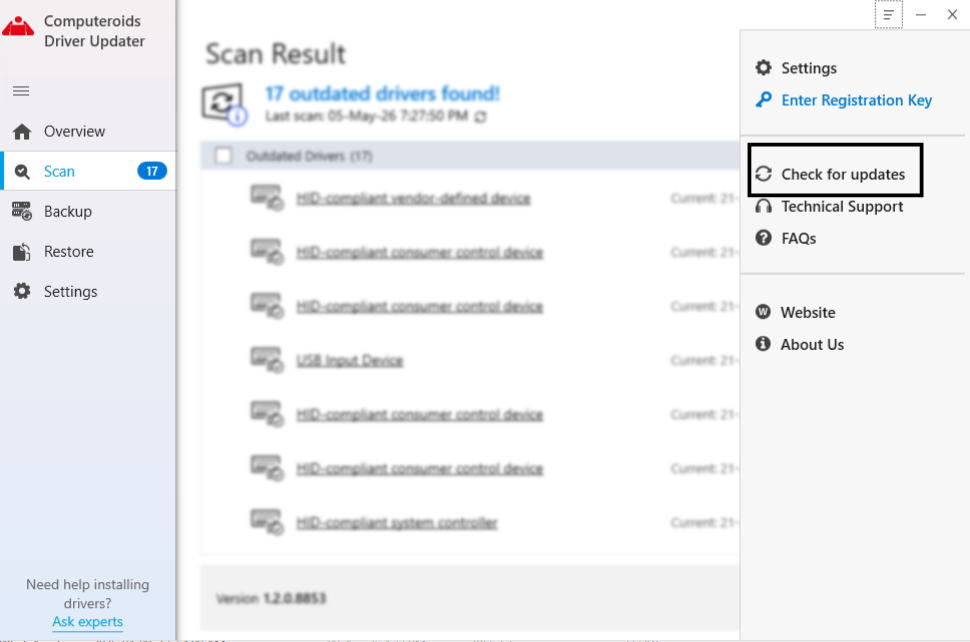
Click the down arrow next to the Help option and select Check for Updates.
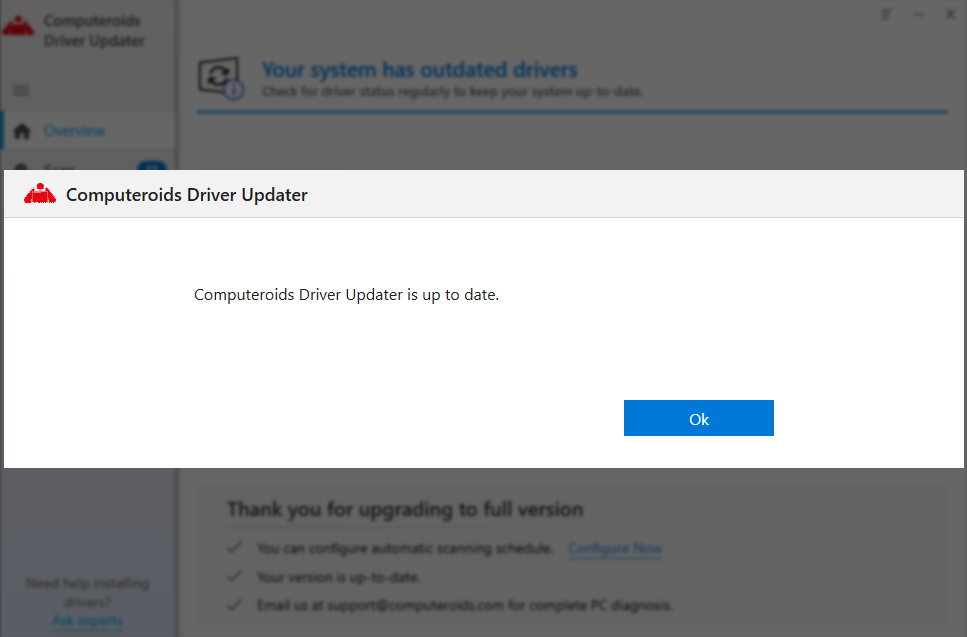
Let the product look for updates and install them.
n done, you will get a success message.
We would like your permission to use your data for the following purposes:
These cookies are required for good functionality of our website and can't be switched off in our system. More..
Usually these cookies are set by your actions in your requests for our services. Examples of these actions are logging in, filling in forms or setting your privacy preferences. It is possible to make your browser block these cookies, but some parts of our website may not work properly when these are blocked.
Shared with
CookieFirst
 Privacy policy
We use these cookies to provide statistical information about our website - they are used for performance measurement and improvement.More..
This category is also known as Analytics. Activities like page visits counting, page loading speed, bounce rate and technologies used to access our site are included in this category.
We use these cookies to enhance functionality and allow for personalization, such as live chats, videos, and the use of social media.More..
These cookies can be set by ourselves or by our third party service providers, whose digital services we have added. If you do not allow these cookies, some of these functionalities may not work properly.
These cookies are set through our site by our advertising partners. Data is collected for the purpose of advertising personalization and measuring the effectiveness of advertising campaigns. Data may be shared with Google LLC, more information can be found here. More..
These cookies can be used by third party companies for creating a basic profile of your interests and show you relevant ads on other websites. They identify your browser and your device. If decide to disallow these cookies, you will not be tracked by our targeted advertising across other websites.
This cookie list generally shows all cookies found on this website. It does not reflect the user's individual opt-out choices.
Updated: 7/16/2024, 11:30 AM
AWSALBCORS
Domain name: computeroids.com
Expiration time: Session
Type:
Cookie
This cookie name is associated with the Amazon Web Services Elastic Load Balancing
functionality for routing client request on the server.
cookiefirst-consent
Domain name: computeroids.com
Expiration time: a
year
Type: Cookie
Provider: Cookie First
This cookie saves your cookie preferences for this
website. You can change these or withdraw your consent easily.
cookiefirst-consent
Domain name: computeroids.com
Expiration time:
Persistent
Type: Local storage
Provider: Cookie First
This cookie saves your cookie
preferences for this website. You can change these or withdraw your consent easily.
cookiefirst-id
Domain name: computeroids.com
Expiration time:
Persistent
Type: Local storage
Provider: Cookie First
This cookie contains your unique ID
so CookieFirst can identify unique visitors to this website.
_clsk
Domain name: computeroids.com
Expiration time: a day
Type:
Cookie
Provider: Clarity (Microsoft)
This cookie connects multiple page views by a user into a
single Clarity session recording.
Updated: 7/16/2024, 11:30 AM
Cookies and similar technologies are very small text documents or pieces of code that often contain a unique identification code. When you visit a website or use a mobile application, a computer asks your computer or mobile device for permission to save this file on your computer or mobile device and gain access to information. Information collected through cookies and similar technologies may include the date and time of the visit and how you use a particular website or mobile application.
Cookies make sure that during your visit of our online shop you remain logged in, all items remain stored in your shopping cart, you can shop safely and the website keeps running smoothly. The cookies also ensure that we can see how our website is used and how we can improve it. Furthermore, depending on your preferences our own cookies may be used to present you with targeted advertisements that match your personal interests.
These cookies are necessary for the website to function properly. Some of the following actions can be performed by using these cookies.
These cookies are used to gather statistical information about the use of our website, also called analytics cookies. We use this data for performance and website optimization.
These cookies enable more functionality for our website visitors. These cookies can be set by our external service providers or our own website. The following functionalities may or may not be activated when you accept this category.
This site uses cookies to provide an improved digital experience. You can learn more about the cookies we use as well as how you can change your preferences by clicking Cookie Settings. By continuing to use this site without changing your preferences, you are agreeing to our use of cookies.
CALL NOW

Please contact support via email or phone for assistance.