Home / User Guide / General Faqs

General FAQs

Q1. Which Windows versions does Computeroids support?

Computeroids supports the following Windows versions:

  • Windows 11 (32-bit and 64-bit)
  • Windows 10 (32-bit and 64-bit)
  • Windows 8 (32-bit and 64-bit)
  • Windows 7 (32-bit and 64-bit)

There are no versions available for macOS or Linux.

If you still have questions, you can contact support via email. support@computeroids.com

Q2. How safe is Computeroids?

Computeroids uses a vast database of official drivers, matching outdated drivers with the correct device type and model. It also creates backups of your drivers, allowing you to restore previous versions if needed.

You can ignore specific drivers you don’t wish to update by adding them to the Exclusion List (accessible via Settings). These drivers won’t be suggested again.

With these safety features, Computeroids is designed to provide a secure driver update experience.

For more details, you can reach out via email support. support@computeroids.com

Q3. What drivers does Computeroids work with?

Computeroids can detect and update outdated drivers for most PC hardware components, including:

  • Sound cards
  • Graphics/video cards
  • Network adapters
  • Printers and scanners
  • USB-connected devices

…and many more.

Q4. In what languages is Computeroids available?

Computeroids is available in multiple languages, including:

English, Danish, Dutch, German, French, Italian, Japanese, Norwegian, Spanish, Swedish, Finnish, Russian, Chinese, and Portuguese.

To change the language:

  • Launch Computeroids.
  • Click the down arrow next to the language/country icon.
  • Select your preferred language from the dropdown.

The application will restart in the selected language.

Q5. How do I install Computeroids?

Installing Computeroids is simple:

After completing these steps, the software will be installed on your PC.

Q6. What features does Computeroids offer?

Computeroids includes a wide range of useful features, such as:

Additional features and benefits can be explored after installation.

Q7. How can I back up drivers in Computeroids?

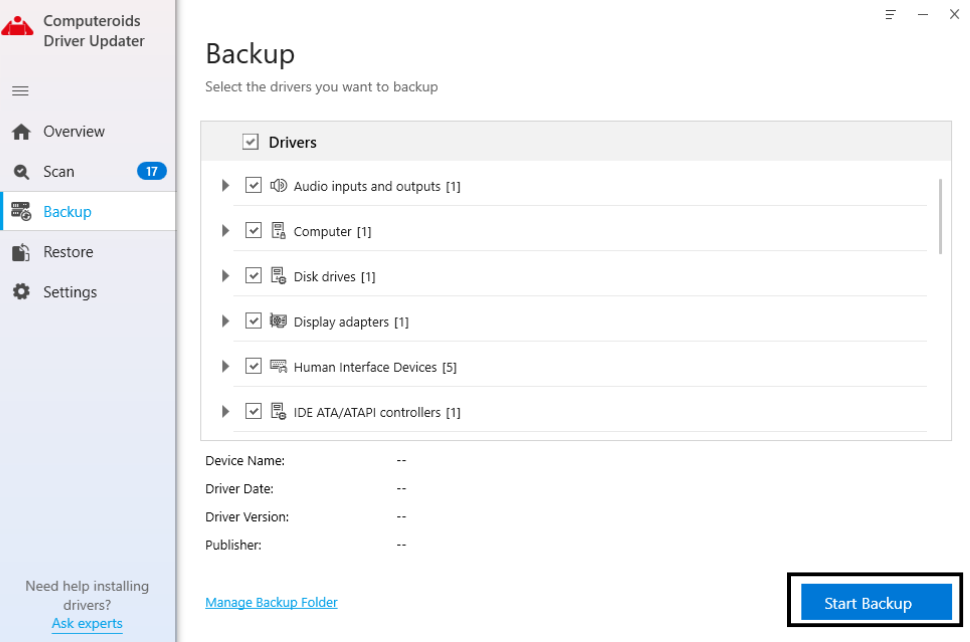
Driver backups are essential for recovery in case of issues. To back up drivers:

  • Launch Computeroids and go to the Backup tab.
  • Choose whether to back up all drivers or selected ones.
  • Click Start Backup after selecting drivers.
  • Wait for the backup process to complete.

Once done, you’ll receive a confirmation message showing how many drivers were backed up.

Q8. How can I restore previous drivers in Computeroids?

To restore drivers:

  • Launch Computeroids and open the Restore tab.
  • Select the backup date.
  • Computeroids User Interface
  • Click Load Backup, choose the driver(s), and click Restore.
  • Wait for the process to finish.

After completion, your PC may restart automatically or prompt you to restart.

Q9. Why should I update my device drivers?

Drivers act as a bridge between your hardware and system commands. Without updated drivers, your system may not function properly.

Keeping drivers updated helps:

  • Prevent gaming, printing, and system errors
  • Improve overall PC performance
  • Fix issues like system crashes (e.g., Blue Screen errors)

Regular updates ensure smoother performance and better system stability.

Privacy Settings

Privacy Policy

We would like your permission to use your data for the following purposes:

Necessary

These cookies are required for good functionality of our website and can't be switched off in our system. More..

Usually these cookies are set by your actions in your requests for our services. Examples of these actions are logging in, filling in forms or setting your privacy preferences. It is possible to make your browser block these cookies, but some parts of our website may not work properly when these are blocked.

Shared with

Performance

We use these cookies to provide statistical information about our website - they are used for performance measurement and improvement.More..

This category is also known as Analytics. Activities like page visits counting, page loading speed, bounce rate and technologies used to access our site are included in this category.

Functional

We use these cookies to enhance functionality and allow for personalization, such as live chats, videos, and the use of social media.More..

These cookies can be set by ourselves or by our third party service providers, whose digital services we have added. If you do not allow these cookies, some of these functionalities may not work properly.

Advertising

These cookies are set through our site by our advertising partners. Data is collected for the purpose of advertising personalization and measuring the effectiveness of advertising campaigns. Data may be shared with Google LLC, more information can be found here.    More..

These cookies can be used by third party companies for creating a basic profile of your interests and show you relevant ads on other websites. They identify your browser and your device. If decide to disallow these cookies, you will not be tracked by our targeted advertising across other websites.

We use cookies Privacy-Policy

We may place these for analysis of our visitor data, to improve our website, show personalised content and to give you a great website experience. For more information about the cookies we use open the settings.

Disclaimer

Computeroids Driver Updater is an independent third-party utility software developed and offered by Computeroids, owned by Sapphire Softech Solutions LLC. Computeroids is not affiliated/endorsed/officially connected to any hardware manufacturer, printer brand, or original equipment manufacturer (OEM). Our software is designed to scan system and update outdated, missing, or incompatible drivers including Hardware, Display, Sound, USB, Printers, Network Drivers & etc.

CALL NOW

Call us